

Google Images is getting a new look and a smarter way to help people discover pictures, ideas, products, places, and inspiration.
For many years, Google Images has mainly worked as a place where people type a keyword and browse through a grid of pictures. But image search is changing. Google is now making visual discovery more interactive, personalized, and useful.
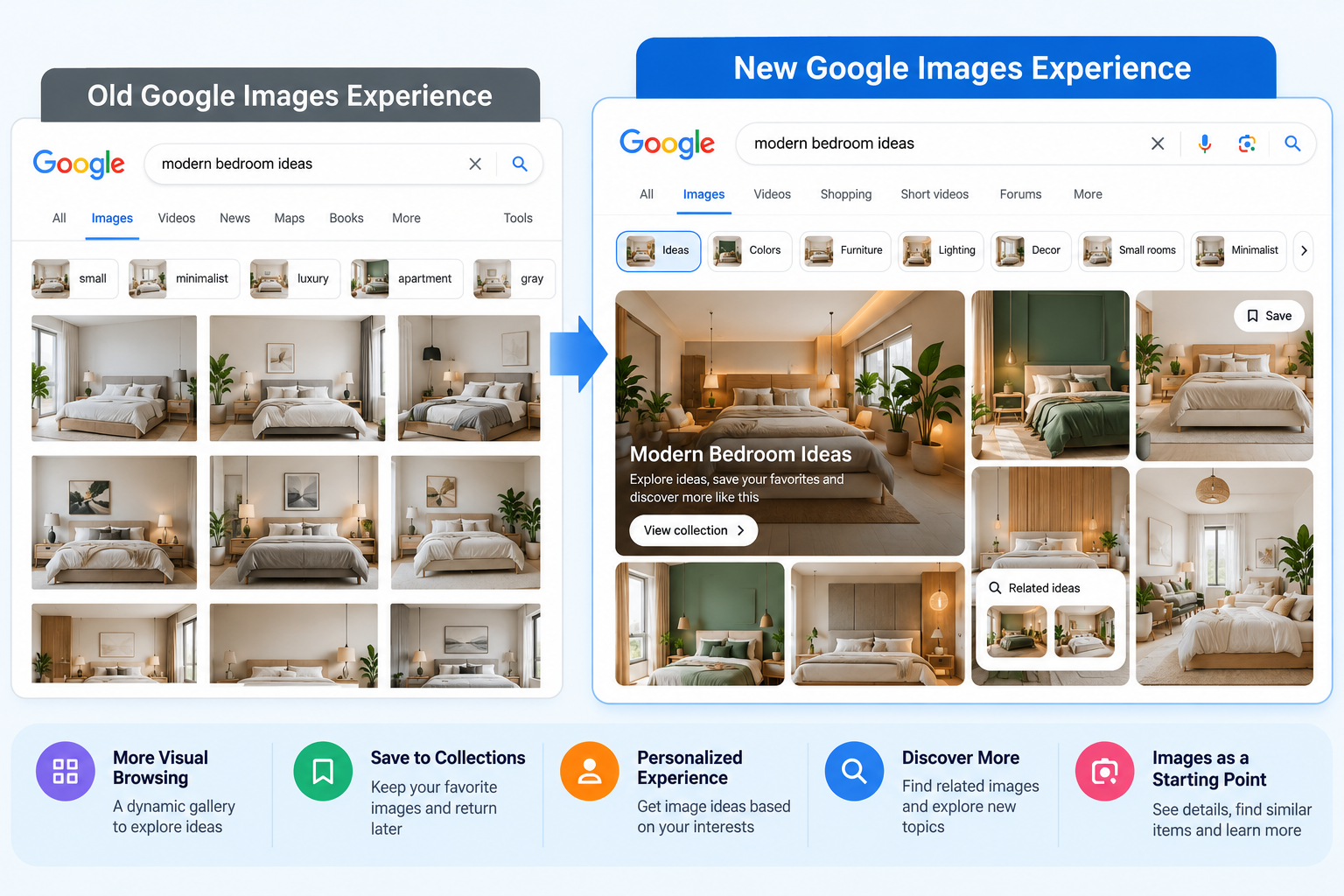
The new Google Images experience is designed to help people explore images instead of simply searching for one specific picture. Users can discover new ideas, save interesting results, and continue exploring topics based on their interests.
This change is also important for bloggers, website owners, photographers, and anyone who uses images online.
What Is the New Google Images Experience?
The new Google Images experience gives users a more visual way to explore the web.
Instead of only showing image results after a search, Google is creating a more dynamic browsing experience. Users can explore different types of images based on their interests and discover topics they may not have searched for directly.
For example, someone planning to renovate their home may start by looking for living room ideas. While browsing images, they may discover different furniture styles, wall colors, lighting ideas, and room designs.
This makes image search more like a visual discovery tool.
Instead of:
Search → Find an image → Leave
the experience can become:
Search → Explore → Discover → Save → Continue searching
Google Images Is Becoming More Personalized
One of the important changes is personalization.
Google is making it easier for users to continue exploring topics they are interested in. Users can save ideas into collections and return to them later.
For example, someone planning a trip could save images related to:
- Hotels
- Tourist attractions
- Restaurants
- Beaches
- Travel outfits
- Places to visit
Similarly, someone planning a home renovation could create collections for kitchens, bedrooms, furniture, lighting, and decoration.
This can make Google Images more useful for people who are researching something over several days or weeks.
Images Are Becoming a Starting Point for Search
Another major change in search is that an image can now become the starting point for a new search.
Imagine that you see a picture of a living room. You like the sofa, lamp, table, and wall decoration, but you don’t know the names of these products.
With modern visual search tools, you can use the image to find more information about the objects shown in it.
Google can understand different parts of an image and provide related search results.
This is particularly useful when you know what something looks like but don’t know what it is called.
Google Lens Makes Visual Search More Useful
Google Lens has already changed the way people search using images.
Instead of typing a description into Google, users can use their camera or an existing image to search.
For example, you could take a picture of:
- A plant
- A piece of furniture
- A product
- Clothing
- A landmark
- Food
- A pair of shoes
Google can then try to identify the object and show relevant information.
This makes search more natural because people don’t always know the correct words to describe what they are looking at.
Circle to Search Can Find Objects in Images
Google has also been improving Circle to Search.
The feature allows users to select something on their screen and search for it without leaving the current application.
For example, imagine watching a video where someone is wearing a particular pair of shoes. Instead of taking a screenshot and manually searching for the shoes, you can select the shoes on the screen and search for similar information.
Google has also expanded visual search so that users can work with multiple objects in an image.
This can be useful for shopping, fashion, travel, home decoration, and many other activities.
AI Is Changing How Google Understands Images
Artificial intelligence is an important part of this change.
Traditional image search mainly depended on information such as the image file, webpage content, surrounding text, and other signals.
Modern AI systems can understand much more about the actual content of an image.
For example, an image might contain:
- A person
- A laptop
- A desk
- A coffee cup
- A plant
AI-powered visual search can understand these objects and their relationship to each other.
This allows Google to provide more relevant results even when the user does not describe the image perfectly.
What Does This Mean for Image SEO?
The changes to Google Images are important for website owners because images can become another way for people to discover their websites.
In the past, many website owners treated images mainly as decoration.
Today, images can support:
- Search visibility
- User engagement
- Visual search
- Product discovery
- Content discovery
- Brand awareness
This makes image SEO more important.
Website owners should make sure their images are useful, relevant, and properly optimized.
Use Descriptive Image File Names
The name of an image file can provide useful information about what the image contains.
For example, instead of:
IMG_92831.jpg
use something descriptive such as:
modern-bedroom-design.jpg
A descriptive filename gives search engines additional context about the image.
However, avoid adding unnecessary keywords just to manipulate search rankings.
Write Useful Alt Text
Alt text is another important part of image optimization.
It helps explain an image to users who cannot see it and provides search engines with additional information.
For example, instead of:
image of room
you could write:
Modern bedroom with a wooden bed, bedside table, and wall lighting
The alt text should describe what is actually visible in the image.
Don’t fill alt text with a long list of keywords.
Keep Images Relevant to the Content
An image should match the topic of the webpage.
For example, if you are writing an article about public domain images, use examples that are actually related to public domain content.
Adding a random stock photograph simply because an article needs a featured image does not provide much value.
Relevant images help users understand the content more easily.
Use High-Quality Images
Image quality also matters.
A blurry or heavily compressed image can make a webpage look less professional.
At the same time, extremely large image files can slow down your website.
The goal is to find a good balance between:
Quality + File Size + Page Speed
Modern image formats such as WebP and AVIF can help reduce file sizes while maintaining good visual quality.
Create Original Visual Content
If possible, create original images rather than using the same stock photographs found on hundreds of other websites.
Original content can include:
- Screenshots
- Infographics
- Charts
- Diagrams
- Tutorials
- Product photographs
- Original illustrations
- Before-and-after images
- Step-by-step visuals
For many topics, an original image can provide more value than a generic stock photograph.
Google Images Is Becoming More About Discovery
One of the biggest changes is the move from simple image searching to visual discovery.
There is a difference between searching for a specific image and exploring images for inspiration.
For example:
Specific search:
“Google logo PNG”
Discovery search:
“modern website design ideas”
The first search has a clear destination.
The second search is about exploring possibilities.
The new Google Images experience is designed to make the second type of search more engaging.
What Does This Mean for Bloggers?
For bloggers, this is a good reason to take image optimization more seriously.
A blog post should not depend only on text.
Useful images can explain difficult concepts, show examples, and help readers understand information faster.
For example, a technology blog could use:
- Screenshots
- Software interface examples
- Comparison graphics
- Diagrams
- Charts
- Step-by-step images
A travel blog could use:
- Destination photographs
- Maps
- Hotel images
- Local attractions
- Food photographs
The right images can make content much easier to understand.
Will the New Google Images Replace Traditional Image Search?
Probably not.
Traditional image search is still useful when users know exactly what they are looking for.
For example:
“Free transparent PNG icons”
or
“WebP image example”
But visual browsing is more useful when users are still exploring.
For example:
“Minimalist bedroom ideas”
or
“Small kitchen design ideas”
Both types of search can work together.
Traditional search helps people find something specific, while visual discovery helps people explore ideas.
What Website Owners Should Do Now
You do not need to completely change your SEO strategy because of the new Google Images experience.
Instead, focus on improving the quality and usefulness of your visual content.
Here are some simple steps:
- Use relevant images.
- Create original visual content when possible.
- Use descriptive filenames.
- Add accurate alt text.
- Keep images related to the surrounding content.
- Compress large image files.
- Use modern image formats where appropriate.
- Make images easy to view on mobile devices.
- Avoid unnecessary keyword stuffing.
- Add useful information around important images.
Most importantly, create images for people first and search engines second.
The Future of Image Search
Search is becoming increasingly visual.
People no longer need to know exactly what something is called before they can search for it. They can take a picture, select an object, upload an image, or simply show Google what they are looking for.
Google Images is moving in the same direction.
The combination of AI, Google Lens, Circle to Search, personalized collections, and visual browsing is making images a bigger part of how people discover information online.
For website owners, this means images should no longer be treated as an afterthought.
A useful, relevant, well-optimized image can help explain your content and potentially create another path for users to discover your website.
Conclusion
Google Images is moving beyond the traditional image search experience.
The new visual browsing features make it easier for users to explore ideas, discover related content, save interesting images, and continue their visual searches.
At the same time, improvements in AI and visual search are making it easier for Google to understand what appears inside an image.
For bloggers and website owners, the message is simple: good image SEO is becoming more important.
Use useful images, write accurate alt text, choose descriptive filenames, optimize image size, and create original visual content whenever possible.
As search becomes more visual, websites that treat images as valuable content—not just decoration—will be better prepared for the next stage of search.